
Help! My Two Vancomycin AUC Calculators Disagree
Steph’s Note: This week, we’re going back to one of my all-time favorite topics…vancomycin. (Y’all know I love some kinetics!) This post is also going to be about one of my favorite soapboxes…making sure you still use your brain even if you’re using a calculator. You gotta understand your input to understand your output, right?
Here to help us recognize potential points of confusion when using vancomycin calculators is Mario Cardenas, PharmD, MBA. Dr. Cardenas is a clinical pharmacist and preceptor in McAllen, Texas. He earned his PharmD from MCPHS University and his MBA with a specialization in healthcare from The University of Texas at Tyler. He is the founder of Dosys Health, which develops Vancomyzer.
Five Things to Check Before Changing the Dose
You enter the same patient's information into two vancomycin calculators. One gives you an AUC24 of 480 mg·h/L. The other gives you 610 mg·h/L.

The second calculator was supposed to settle the question.
What do you do now? (Image) Let’s back up a quick second to make sure we’re all on the same page.
How AUC Calculators Estimate Exposure
AUC stands for area under the concentration-time curve. Picture a vancomycin concentration on a graph as it rises during an infusion and falls afterward. The area beneath that curve describes drug exposure over time, AUC24 covers 24 hours. A trough is the concentration just before the next dose. It is one point on that curve, so it doesn’t really tell you the whole day's exposure by itself.
An AUC calculator estimates exposure from patient information and measured levels. Depending on the tool, you may enter age, weight, height, sex, serum creatinine, and information about dialysis. Once treatment has started, the calculator also needs the doses actually given, infusion times, measured vancomycin concentrations, and the exact sample collection times. Always use the administration record since a scheduled dose may differ from what was given.
First-order equation calculators use two appropriately timed concentrations near steady state, when the concentration pattern is repeating from dose to dose. Bayesian calculators combine a model built from other patients' data with information from the patient that’s in front of you.
Think of Bayesian modeling like a navigation app estimating your arrival time. Before you leave, it uses what usually happens on that route. As you drive, your progress updates the estimate. Bayesian dosing works similarly. You start with an informed estimate and then revise it when new measurements arrive.
The Bayesian calculator starts with estimates from the population model and the patient’s characteristics. It uses the recorded doses and infusion times to predict the concentration at each blood draw, then compares those predictions with the measured levels. It then updates estimates of clearance and distribution, balancing the model's expectations with the measurements and the uncertainty in both. The updated model describes a concentration curve; the area under 24 hours of that curve is the estimated AUC24.
A measured level captures one point in time. The model estimates exposure between blood draws and predicts exposure under a different regimen. It can also estimate exposure before steady state; whether one level is enough depends on the model and patient. The guideline prefers two levels for Bayesian estimation.
Two calculators can give different estimates from the same levels because they use different models. The estimate still depends on an appropriate model and accurate dose and sample times.

Even JD knew the vancomycin calculator wasn’t a crystal ball.
Choose a starting regimen using the patient's clinical situation and local protocol, obtain levels, estimate AUC and review whether the dose or interval needs adjusting. Reassess during treatment, especially if kidney function changes. A proposed regimen's AUC is a prediction to review, not a measured outcome or a guarantee. (Image)
This article is about adults on intermittent IV vancomycin. For serious MRSA infections, the 2020 consensus guideline recommends an AUC24 of 400–600 mg·h/L, assuming a broth microdilution MIC of 1 mg/L. Much of the evidence comes from complicated MRSA bloodstream infections, so its application to other indications requires caution.
Aim to reach target early, ideally within 24–48 hours; always investigate discrepancies without delaying the patient's care. For a fuller discussion of the AUC dosing approach, see tl;dr's guide to vancomycin AUC/MIC dosing.
In our hypothetical case mentioned above, one estimate is within the usual target range, and the other is above it. Before changing the dose, check the dosing history, the time period each tool estimates, the calculation method and possible entry errors. To help with evaluating your calculated estimates, here are the 5 questions you should ask yourself.
1. Are you comparing the same dose and time period?
Identify what each AUC estimate number describes. Is it a first-day AUC, exposure over a later 24-hour period, or a steady-state projection? Similar labels can conceal different time periods.
Check whether both results describe the current regimen. One screen may already be showing the projected AUC for its suggested replacement, while the other is showing the AUC for the current regimen.
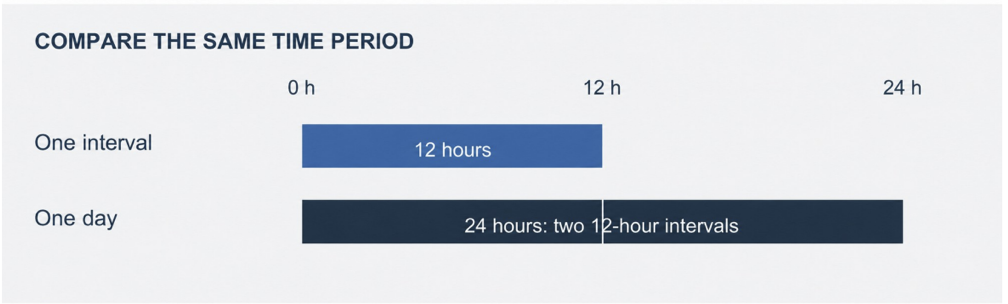
Figure 1. An interval AUC and a daily AUC can look like conflicting results when the time period isn't prominent on the results screen. Illustrative 12-hour regimen.
At steady state, an interval AUC can be scaled to a daily AUC for an unchanged regimen. That shortcut doesn't work for a specific 24-hour period before steady state or after a regimen change, especially with a loading dose or changing clearance.
For a regular IV regimen at steady state, with stable clearance and linear elimination, daily AUC equals daily dose divided by clearance. Once the dose and time period match, compare the clearance estimates; they may explain the discrepancy. For schedules such as every 18 or 36 hours, distinguish average daily exposure from exposure during a particular 24-hour period.
If one result is labeled AUC/MIC, confirm which MIC it assumed before comparing it with an AUC24.
2. What was actually given, and when was the blood drawn?
Reconcile the calculator entries with the medication administration record and laboratory collection records: infusion start and stop times, preceding doses, and actual blood-draw times. Use administration and collection times rather than scheduled doses or result-posting times.
Consider a hypothetical infusion that starts at 08:00 and ends at 10:00, with blood drawn at 11:00. The next dose is scheduled for 20:00 but starts at 21:00.
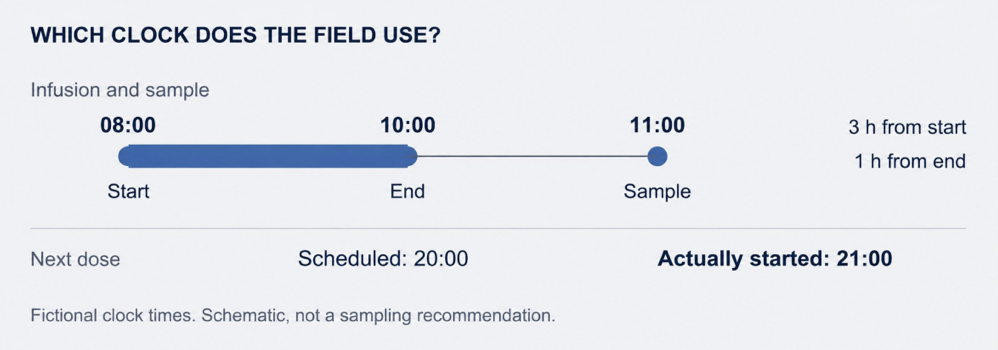
Figure 2. The sample is three hours after infusion start and one hour after infusion end. These hypothetical times illustrate data entry; they are not a recommended sampling schedule.
Check how each calculator defines “time after dose.” Some count from infusion start, others from infusion end. Here, entering three hours when the tool expects one hour shifts the sample by two hours. Check the dates when doses and samples cross midnight.
A longer infusion of the same dose produces a lower, later peak. With an unchanged daily dose and stable clearance, steady state daily AUC remains the same. An incorrect infusion duration can alter the calculator’s interpretation of a measured concentration and its estimates of clearance and AUC.
The guideline's first order equation approach uses two concentrations near steady state: a post distribution level 1–2 hours after the end of the infusion and an end of interval trough. Drawing both in the same interval is preferred but not required. For levels from different intervals, confirm that the dosing history and clinical course meet the method's assumptions. See the sampling recommendations.
A sample drawn during distribution can compromise a first-order estimate even when its time is entered correctly. An unexpected level also warrants review of collection technique, possible line contamination, and unit conversion.
Check how each tool handles a loading dose. The guideline allows a loading dose of 20–35 mg/kg using actual body weight, up to 3,000 mg, for critically ill adults with serious MRSA infections. Early concentrations can still reflect that loading dose. If it is omitted or entered as a smaller maintenance dose, the calculator uses an incorrect dosing history. That can distort its estimates of clearance and AUC; the direction and size of the error depend on the model and sample timing. Two calculators that handle the loading dose differently can disagree for that reason alone.
Some calculators have no way to enter a loading, delayed, or held dose. If you’re not able to, document that limitation, and use an approved tool that can record what was actually given.
3. What does the calculator assume about your patient?

Check the assumptions of the calculator!
Bayesian calculators may use the same history and levels but different population models. With only one or two levels, model choice can substantially affect the estimate. Sample timing and the model’s treatment of assay error also influence how strongly the measured concentrations affect the fit. (Image)
Broeker and colleagues compared 31 models using data from 292 hospitalized patients. The Goti model performed best in that evaluation. That result does not establish that it performs best in every population or that a particular calculator applies it correctly.
When assessing a calculator, ask:
Was the model studied in patients like mine? Look at the patient population, including kidney function, age, and body size.
Have its calculations been checked against reference calculations? Look for documented comparisons; a citation for the model isn't enough on its own.
Has the calculator been tested with patient data? Ask how well its predictions matched measured concentrations in the kinds of patients you treat.
Address these questions during an institutional review or with the developer. Evidence supporting a population model does not establish the performance of a particular calculator.
The current guideline prefers Bayesian AUC estimation. It describes using one or two concentrations, including at least one trough, with two preferred. A trough alone may be enough for some patients, but that doesn't mean every calculator can estimate AUC reliably from one level in every population. Bayesian methods can also estimate exposure before steady state, as long as the model suits the patient and the dosing history is entered correctly.
In simulations by Aljutayli and colleagues, calculator performance depended on the model, the sampling, and whether steady-state assumptions held. Their early treatment results came from simulations without a loading dose. The study also evaluated methods, not whether a product improves patient outcomes.
4. Did both tools use the same patient information?
Calculators can use the same patient values differently. Check the required weight measure and how the model represents kidney function. One model may use Cockcroft–Gault creatinine clearance; another may use serum creatinine directly. A calculator may also display CrCl without using it to estimate vancomycin exposure.
Compare the dates and times of creatinine measurements, dialysis status, and automatic unit conversions. Use each tool’s specified inputs and follow local protocol. Changing weight conventions or rounding creatinine during the comparison adds another difference between the calculations.
If kidney function is changing, look at the trend and the timing of the lab results. Serum creatinine can lag behind a change in function, and calculators differ in how they use updated values. An estimate based on today's labs may not predict tomorrow's exposure well, so reassess and monitor even if the calculators agree. See the monitoring recommendations.
5. Were the same levels used, and what led to the suggested dose?
Confirm which concentrations each tool included. Check for excluded samples and duplicate entries, particularly when results are both imported and entered manually. A duplicated level receives excess weight. Review substantial differences between predicted and measured concentrations.
In a study of 978 adults by Olney and colleagues, first-order equations and Bayesian estimates using two levels placed patients in the same AUC category about 87% of the time. Agreement was about 77% for equations versus Bayesian estimates using one level, and about 89% for Bayesian estimates using two levels versus one.
The categories were below, within, or above the target range. Category agreement does not establish accuracy against the patient’s true AUC. The study used one Bayesian program and excluded patients with a creatinine clearance of 30 mL/min or less, renal replacement therapy, or acute kidney injury before vancomycin started. The study's methods and limitations should guide how you apply these estimates.
Read what each uncertainty display represents. A shaded band around the concentration curve and a probability of reaching the AUC target answer different questions.
Compare how each calculator selects a regimen. Similar exposure estimates can lead to different recommendations when the available dose increments, intervals, or infusion durations differ.
If you still can't explain the difference, take the comparison to the treating team or a colleague with dosing expertise.
Averaging the two recommendations won't resolve it.
Let’s Look at an Example of Conflicting Results
Now that we’ve reviewed 5 common areas to review when figuring out discrepancies between vancomycin AUC calculators, let’s take a moment to put these tools into action. The following is a patient case example comparing 2 calculators so you can see what some of the input and output looks like.
FYI Disclosure for the worked example: I am the founder of Dosys Health, which develops Vancomyzer, and I have a commercial interest in it. Vancomyzer has not yet been independently validated in patients. But this example only shows how to compare two tools. It doesn't show which is more accurate, and it doesn't endorse either recommendation.
So here we go!
I entered the same hypothetical patient into two real calculators: a 60-year-old man, 80 kg, 175 cm, with stable serum creatinine of 1.0 mg/dL, no renal replacement therapy, and no critical illness. He received five 1,000-mg doses every 12 hours, each over two hours, starting September 21 at 08:00. A single level of 12 mg/L was drawn September 23 at 19:30, after the fifth dose. There were no loading, missed, delayed, or extra doses.
The patient is hypothetical and the outputs are the recorded results, not an accuracy test. I used one level in both calculators to obtain Bayesian estimates. In that run, entering two levels caused VancoCalc to use Sawchuk–Zaske equations. In Vancomyzer, I left the steady-state box unticked because five doses alone do not establish steady state.
The earlier delayed dose timeline is a separate illustration. The screen labels did not confirm that the AUC time periods matched - that remains unresolved.
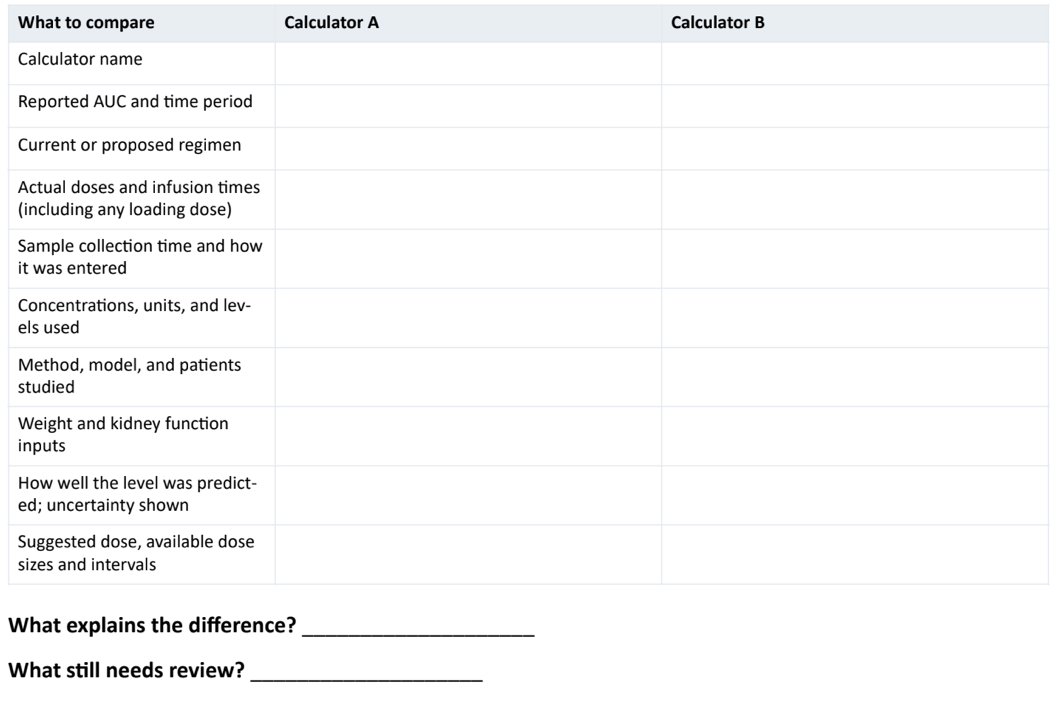
A completed comparison worksheet:
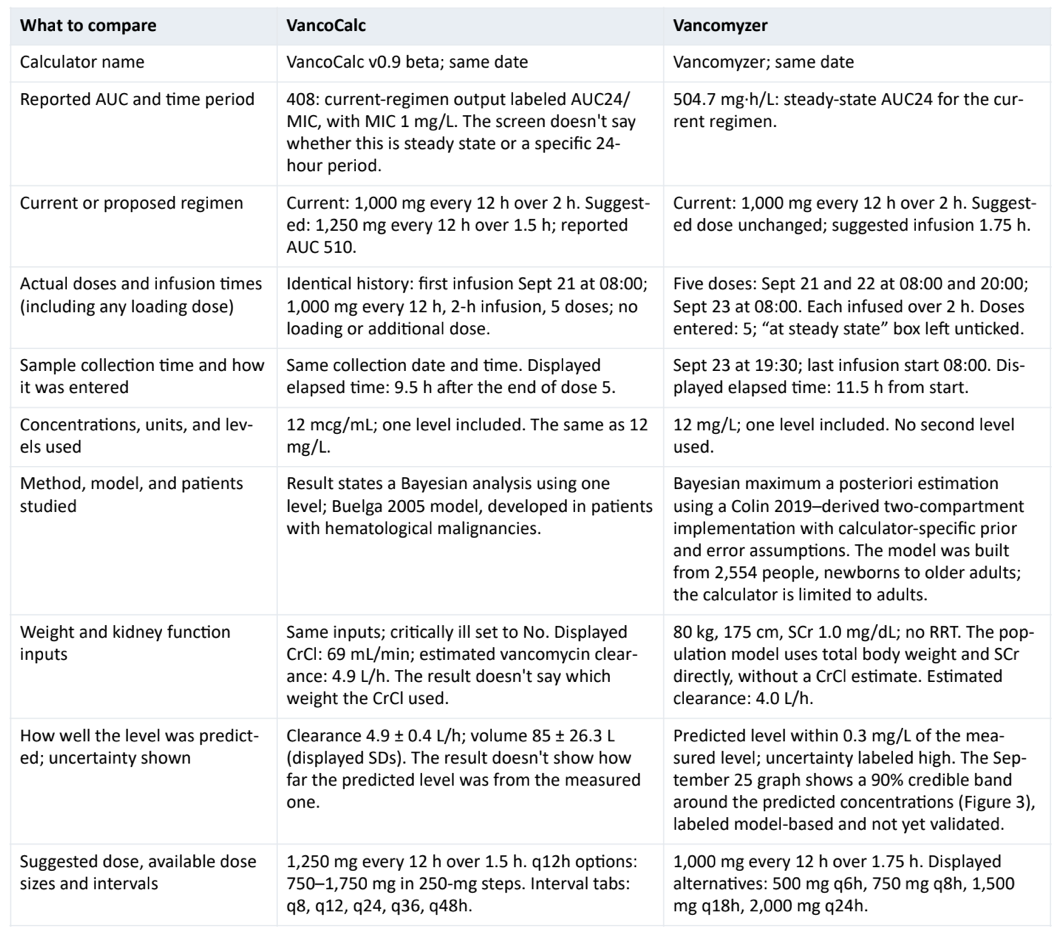
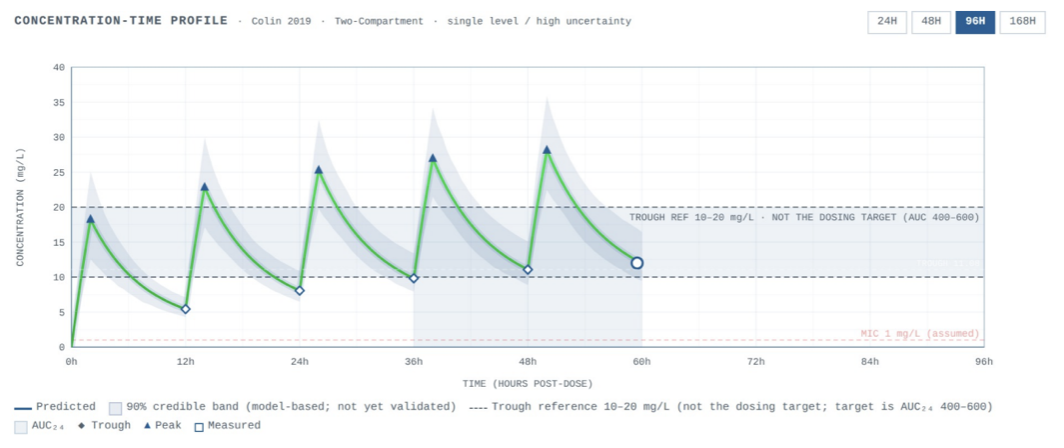
Figure 3. Vancomyzer's September 25 graph for the worked comparison: five doses, the measured 12 mg/L level at 59.5 hours, and the 90% band. The band reflects uncertainty in the patient's estimated clearance and volumes. It isn't a range for AUC, and it hasn't yet been checked against patient data.
What can we explain?
The sampling times agree: 11.5 hours from the start of the infusion is 9.5 hours from its end. The estimated clearances differ: about 4.9 L/h in VancoCalc and 4.0 L/h in Vancomyzer. That could help explain the different exposure estimates once the AUC time periods are confirmed. Both current regimen results fall within the 400 to 600 target, yet the suggested doses differ. Looking only at the suggested regimen AUCs, 510 and 504.7 would hide that difference. Both suggested infusion times also differ from the two hours actually given. However, none of this tells us which recommendation is right.
What still needs review?
VancoCalc’s screen doesn't say whether its AUC is a steady-state projection or a specific 24 hour period; Vancomyzer labels its AUC24 as a steady state projection. Confirm that before treating the two values as the same measure. The population models, their estimates of the patient's pharmacokinetic parameters, and the rules for choosing a dose also differ. One comparison can't isolate a single cause or show which tool is more accurate. A close fit to one level doesn't mean the AUC is accurate, and neither Vancomyzer's band nor VancoCalc's standard deviations is a range for the AUC itself.
Sources and limits: Vancomyzer equations, VancoCalc, the Buelga model study, and the VancoCalc evaluation. VancoCalc’s published evaluation included 52 adults; Vancomyzer hasn't yet been independently validated in patients. One hypothetical case cannot establish which tool performs better.
Now it’s your turn to put into practice the critical thinking you’ve learned here today. Here’s a blank worksheet for your own calculator comparisons.
Use the same fields to document your comparisons and unresolved questions. Keep patient information within your organization’s approved systems. This worksheet is a teaching aid, not a validated dosing rule.
Checking the sample-time entry
One last tidbit. The worksheet records when the sample was collected and how that time was entered. In this screenshot, Vancomyzer defines the last dose time as infusion start. The point? Verify the convention used by the calculator you are reviewing.
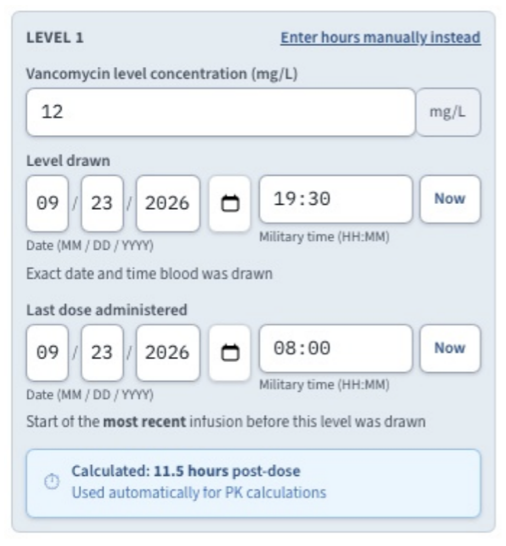
Figure 4. Sample-time entry in Vancomyzer for the worked comparison. The hypothetical level is 12 mg/L, drawn September 23, 2026, at 19:30. The last infusion started that day at 08:00, so the displayed 11.5 hours is correct. With the two-hour infusion, the sample is 9.5 hours after the infusion ended. The other patient and dosing details are in the worksheet.
The tl;dr of Working through Vancomycin AUC Calculator Discrepancies
Check that the AUCs cover the same time period and regimen.
Enter the actual dose history, including any loading dose, and the actual sample times. Then check how each calculator uses the patient's information and levels.
Look at the evidence for the model and for the calculator - separately.
Work through any unexplained difference with the clinical team before acting on either recommendation.